
Zombie Man
-
Posts
10412 -
Joined
-
Try deleting checksum.coh from the CoH directory. Reboot. Start it up again and let it verify files (I hope you're not using the updater bypass!). See if that works.
-
Quote:Originally Posted by PhroX
 Heh, at one point Union had queues to get on

-
Quote:In Beta, we couldn't figure out what the colors meant, we had to be told, and even then we said, "Wuh?"Originally Posted by Transhade
I love the majority of the quality of life improvements. However, this is one is not an improvement in any sense of the word.
Then the usual plea for "looking for more" flag was made to no avail.
However, there were leak throughs of a project that might come to fruition in a future issue: A team server that automatically connects those looking for team with those looking for members. It was never functional and eventually disappeared from view. -
Quote:Set your keybinds to the way you want them.Originally Posted by firespray
1. Whenever I zone, my keybinds reset to default.
Save them to the default file with the keybind save button in Options Window.
Without zoning, immediately log off the long way. Full countdown to server select. Leave game. Reboot.
This should make sure the server's memory and your registry memory are in sync.
Probable success rate: 90% -
Quote:For any group that is 50 or more, you subdivide it with filters.Originally Posted by Golden Girl
How did you find the numbers? The search window was capping at 50 for me.
Example with made up numbers:
So, blueside, I searched by AT. I did the two EATs together, and got 18.
I searched by Blasters and got 50. So, I searched by Blasters with Natural and Tech Origins and got 23. Then I searched by the remaining three origins and got 48. So, there were 71 Blasters.
And so on... -
I see the implementation of this as a good sign that our Devs are paying more attention to the features of graphics cards.
-
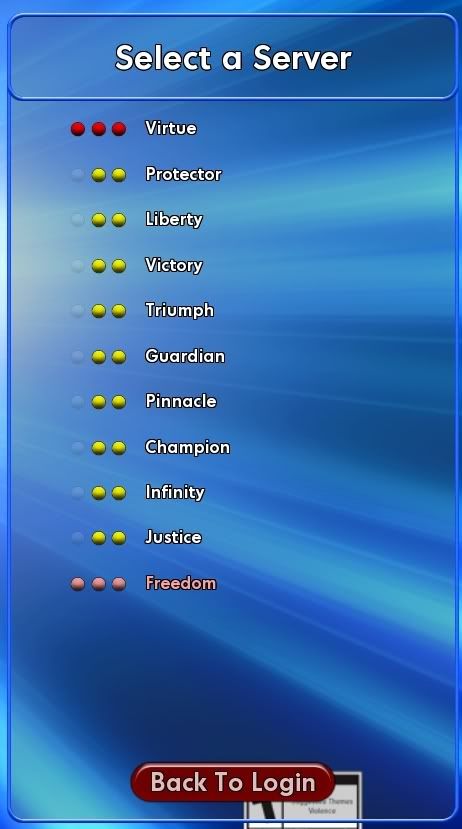
At a time Virtue was moving from Pink to Deep Red, there were:
480 Heroes
289 Villains
707 Praetorians
1,476 Unhidden from /Search. -
-
Something odd is going on with teaming.
I had my two alts, both at level 50, sweep in Dark Astoria for the easy kills of large spawns.
Toon leader got 3 tips and the toon sitter got 1. And then no more. I killed *a lot* more foes and no more tips for the second toon. I switched leadership, I switched who was doing the kills. Still, no more tips.
So, I broke the team and had the toon with just 1 tip start killing. And withing 2 minutes he got 2 more tips.
Odd.
Tips are as common as enhancement drops. And killing bosses is usually a good way to get one immediately. -
You can make a new toon on a less crowded server and transfer later!
-
-
So, you want those yellow servers merged so they can have a queue, too?
-
Quote:Well that's not true.Originally Posted by zachary_EU
Only caps means something.
See your own post above regarding Hover. -
Quote:A truer typo has never been typed.Originally Posted by Acemace
Initially there was XP parody between MA content and dev content.

-
Quote:She's a Peacebringer!Originally Posted by Lothic
1) We know vampires exist.
2) We know werewolves exist.
3) We know shifters (weres that aren't strictly wolves) exist.
4) We know other magical immortals (like Maenads) exist.
5) We know there seems to be a garden-like "alternate world" where both Sookie and Bill have seen elven-like 'magical' people.
6) We know both Sookie and Bill have seen Claudine there, who used the same "light blast" power Sookie has used. -
Quote:Well, that's not true.Originally Posted by zachary_EU
They speeded only hover not fly.
See my post above. -
To see these, I had to reduce the size of the screen so that they were closer together.
-
I'm sure the Tanker forums are hot on this topic.
-
Known problem with water tanks.
-
It could be a body bag. Turn up sound and listen for the humming.
-
Quote:Well, this isn't a feature.Originally Posted by Kheldarn
Zombie, I have some important info for you to add to your guide.
On Thursday, August 12, I discovered that the Shield Patterns (i.e. Cheif, etc.) are not broken, per-say. Rather, they're controlled by the Shader Quality setting.
If it is set to Lowest, Low (No world bumpmaps), or Low (With world bumpmaps), you won't see patterns on any of the Shields, except Kite.
If it is set to Medium or High, patterns show up as they should.
Tonight, I discovered that this also affects things like the Resistance "Plaques". I was standing right in front of one in Imperial City, and couldn't see it. Blondeshell came, and said, "It's right there". I saw nothing on the wall, but when I moved my mouse, the cursor changed to the interactive hand icon.
At that point, I noticed a faint horizontal line on the building. Remembering the issue with Shield Patterns, I changed my Shader Quality from Low (With world bumpmaps) to High. As soon as I pressed Apply, and the changes were made, I could see the grafitti I was supposed to click for the History "Plaque".
I'll put it under known issues. Please make sure you /bug this.
Thanks. -
Quote:Attempt to buy it through GameStop first. When you get to Payment Options, attempt to use the gift card serial and pin numbers to pay. If that doesn't work, then the answer to your second question is 'no.'Originally Posted by Marcian Tobay
This is Going Rogue: Complete Collection, as sold by Barnes & Noble's website. Now, here's the situation:
- I have a $100 Barnes & Noble Gift Card
- I want to buy my partner Going Rogue: Complete Collection
- She wants all of the bonuses that come with GameStop's exclusive version.
Now, Barnes & Noble is affiliated with GameStop. Additionally, the original link says "Available for pre-order from GameStop".
So, here's my question: If I use my Barnes & Noble gift card to buy it from the B&N site, will I get all the GameStop exclusives? Alternatively, may I use the Barnes & Noble card at GameStop's website?
Thanks!
WRT your first question: It doesn't look like B&N will pass on the specials even though they're getting the product from GameStop. The only way to be sure is to call them. -
Quote:It's getting engaged!?Originally Posted by St0n3y
Be on the lookout for a very big announcement reguarding Mids'.
-
Quote:If you've already pre-purchased, it's just 7 USD more for the Item Pack.Originally Posted by Rowdy
Only 10$ more? Sold!
Going Rogue: Complete Edition (i.e., the 'box') includes these extras which pre-purchase didn't get.
Me? I pre-purchased and then I bought the Game Stop pre-order for the box, the extras, the free month, and the GROs, which are exclusive to the Game Stop pre-order. Such is the life of the completionist.
