
Samuel_Tow
-
Posts
14730 -
Joined
-
Quote:Mine never asked to install anything, and indeed did not seem to install anything at all. I'm pretty sure I lacked any sort of meaningful display driver, because my system managed to slow down viewing web pages, and with that processor and video card, it had no business slowing down. I did install the drivers that came with the card, though, before upgrading to the latest from nVidia, but do I seriously need to driver-wipe every time I want to upgrade? nVidia never mentioned that.Originally Posted by Red Valkyrja
 Windows will prompt you to install the video drivers, make sure you click no, so that you can then run the nVidia drivers.
Good call. I was going to repost when I saw this, but I'll probably ask to have this moved. ThanksQuote:Edit: It also appears that the CB forums are going to get locked, I'd PM Avatea or TheOcho to move this down to the Tech forums, rather than re-posting. 
-
Quote:Ugh... But Windows 7 installs drivers on its own even if I don't do anything. Do I seriously need to swipe drivers on every fresh install? Because mine wasn't even set up. The operating system was installed, but it had never actually been run. I ran it for the first time when I got it. It doesn't really get any more new than that.Originally Posted by Red Valkyrja
By "completely fresh machine.... out of the box" do you mean OS installed, plug in the power cord/keyboard/mouse and you're ready to go?
If so then you still need to uninstall the Windows video drivers, run a Drive Sweeper, and install the nVidia drivers.
And it's actually an HP-built machine. I'm not sure if I should try to run more of HP's customer support software, or if I should try to run LESS of it.
*edit*
After having a look at the insides of my box (and it's cramped like you wouldn't believe in there), I THINK my GeForce has all of its power cables going to it... But I don't actually know how many it needs. There are two six-pin power cables plugged into it, which takes up both of the things two six-pin slots, but there is another two-pin slot right beside them that nothing is plugged into. I'm pretty sure that's another power slot, since there are a couple of power cables with ends that look like they could fit, but since I don't actually know what I'm doing, I'd rather not go around plugging cables in willy-nilly. That thing is expensive.
As such, may I ask how I could find out how much power this thing needs and how many of what kind cable need to be plugged into it? I searched Google, but I was only able to find a power drain (said 550 Watts), but not actually how many cables I needed to plug in. Is there some way I can test to see if my card is getting enough power to all components that need it? There was some kind of nVidia system analyser that I had before, but the hard drive that held that fried and I lost the link.
OK, that I can do. The link advises me to run a HijackThis scan, as well. I haven't done that yet, but I could. Should I? Either way, here's what I got:Quote:To provide more info to those with more technical knowledge, run CoH Helper and post the log.
---System information gathered by CoH Helper version 0.1.1.8---
DxDiag gathered at Àïðèë 15, 2010 20:23 (+03:00)
Operating System: Windows 7 Professional 64-bit (6.1, Build 7600) (7600.win7_gdr.100226-1909)
System Manufacturer: Hewlett-Packard
System Model: HP Elite 7000 Microtower PC
BIOS: 11/05/09 10:31:58 Ver: 5.09
Central Processor: Intel(R) Core(TM) i7 CPU 860 @ 2.80GHz (8 CPUs), ~2.8GHz
Memory: 8192MB
.Net Memory Report: 6600MB out of 8183MB available
Page File: 14715MB (1648MB currently in use)
C Drive: (ST31000528AS) 877655MB out of 943357MB (93%) free
D Drive: (ST31000528AS) 820MB out of 8452MB (9%) free
F Drive: (ST3500620AS) 183851MB out of 476937MB (38%) free
L Drive: (YHY I7GPMFS5YV SCSI CdRom Device) zero-size drive
E Drive: (hp DVD-RAM GH40L) zero-size drive
Windows directory location: C:\Windows
DirectX: DirectX 11
DirectX Diag version: 6.01.7600.16385 (64-bit version)
Display Notes: No problems found.
Sound Notes: No problems found.
No problems found.
Input Notes: No problems found.
Monitor:
Monitor's Max Resolution: (blank)
Video Device Name: NVIDIA GeForce GTX 285
Manufacturer / Chip: NVIDIA / GeForce GTX 285
Video Memory: 4077 MB
Driver Version: 8.17.11.9713
Driver Date: 1.01.0001 ã. 00:00:00 ÷.
Driver Language: English
Sound Device Description: Speakers (Sound Blaster X-Fi Xtreme Audio)
Driver File: t3.sys
Driver Version: 6.10.0000.0209
Driver Date: 6.04.2009 ã. 03:22:40 ÷.
Sound Device Description: Digital Audio (S/PDIF) (Sound Blaster X-Fi Xtreme Audio)
Driver File: t3.sys
Driver Version: 6.10.0000.0209
Driver Date: 6.04.2009 ã. 03:22:40 ÷.
WMI Information
Motherboard Manufacturer: MSI
Motherboard Model: (empty)
Motherboard Product: 2A90h
Motherboard Version: 1.0
BIOS Manufacturer: American Megatrends Inc.
BIOS Name: 11/05/09 10:31:58 Ver: 5.09
BIOS Version: HPQOEM - 20091105
BIOS Release: 20091105000000.000000+000
Registry Information for Current User
Resolution: 1280x1024
3D Resolution: 1280x1024 (Not using renderscale)
Full Screen: Yes
Maximized: No
Screen Position: 0, 0
Refresh Rate: 60Hz
Vertical Sync Enabled: Yes
Physics Quality: Medium
Maximum Particles: 50000
Max Particle Fill? 10,000
Physics Card Enabled: No
Anti-aliasing: 4x
Anisotropic Filtering: 4x
Texture LOD Bias: Smooth
Water Effects: High Quality
Bloom: 1,000 (turned off)
Depth of Field Enabled: No
Desaturation Effects (Sepia) Enabled: Yes
Shader Detail: High
World Texture Level: Very High
Character Texture Level: Very High
World Detail Level (Vis_Scale): 1,000
Entity Detail Level: 2,000
Shadows Enabled: Yes
Gamma Correction: 0,855
Geometry Buffers (VBOs) Enabled: Yes
Suppression of Extra Player FX Enabled: No
Suppression of FX When Camera Close Enabled: Yes
Close Suppression Range: 3,000
Show Advertisements: Yes
Audio Mode: Performance
3D Audio: Yes
FX Sound Volume: 0,395
Music Sound Volume: 0,000
Show Advanced Graphics Options: Yes
Overall Graphics Quality: 0,600
Reverse Mouse Buttons: No
Save Login Username: Yes
Transfer Rate: Unknown bytes/second
Current Game Version: 1600.20100114.11T
Installation Directory: F:\GAMES\City of Heroes
Mod files in the Data directory
No modifications found
*edit*
The funky symbols in there is because I'm set to Bulgarian time and currency standards, and apparently the City of Heroes helper doesn't read Unicode well. "Àïðèë" stands for Thursday, I believe, and "ã" should stand for "y.," as in "year." -
Quote:But this is a completely fresh machine. I got it out of the box monday. Had never even been run before I first signed in personally. The only drivers I installed were nVidia's graphics drivers and Creative's sound card drivers and sound suite (sound card control pannel). Well, that and now DirectX. There's literally nothing else on here, not in the form of drivers, at the very least. Should I possibly call support and see if they won't run me through their scanner things (they got to Belarc Advisor last time I had a problem)?Originally Posted by Mephisto_Kur
I would recommend the Driver Sweeper mantra:
uninstall drivers, reboot to safe mode, run Driver Sweeper and remove all traces, reboot, reinstall drivers.
As far as an extra power cable goes... Well, this IS a GeForce GTX 285, so it ought to take at least one extra power cable, but I guess I can unbolt the box and have a look if it won't take an extra one. I did have a guy from the shop look at it, though, and he didn't say anything about it. Put it like this - should there be a cable plugged in to every place a power cable can plug in? Mind you, I can't look NOW as the machine is running, but I'll do that by the end of today. Luckily, while I have a warranty on this one, I don't have a warranty seal on it
-
OK, this is starting to bug me, if only because I've seen it before and I know it could be a sign of a technical problem. I've spent some time complaining about how much Ultra Mode lags for me, but I have reason to believe switching over to my new setup might have something to do with that. See, I switched over from a machine with a GeForce 9800 GT to a machine with a GeForce GTX 285, and I'm seeing the following problem:
Textures seem to load slower on my new card than they did on my old card. Before when I ran City of Heroes and selected a character, the entire model would just pop up on screen in an instant. Now every time I load a texture, I get to watch my character being "built," as it were. I see the model pop in piece by piece as low-res textures are loaded, then I see each low-res texture swap to a high-res version, all of it in the span of around 2 seconds.
In addition to that, I've been running Final Fantasy VII for a while, both before and after the upgrade. Before at least as far as battles go, the game never slowed down at all. Right now, the game gives me these odd 2-second freezes every time it has to load a texture on a new-spawned object in the world. I'm I'm talking serious pause, on the order of 3-4 seconds just staring at a frozen picture with the music running, waiting for my system to load a texture in a 13-year-old game.
This has me concerned. Greatly. It's possible whatever is causing this is leading to reduced performance in-game in other instances, as well. Last time I saw this was when I switched from a 6600 to an 8500, actually grabbing a card that was WORSE than what I already had, despite being a newer generation. Is there any possible explanation why a brand new system with plenty of RAM, a decent processor and a serious video card should stumble on something as simple as loading not too large textures? Could it have something to do with the fact that I'm running Windows 7 x64? I mean, at this point I'm starting to wonder if any of my feedback on Ultra Mode even matters, if my machine is not performing as it should.
I'm in the process of updating my DirectX components as those might not have been installed, but since the game actually uses OpenGL, that shouldn't really make a difference anyway. Is there anything I can do to fix this? Because I was the impression that a GTX 285 was a major step up from a 9800 GT, yet the speed gain isn't what I would have hoped for.
*edit*
In my search for DirectX 11, I found a few odd things on my system. My dxdiag tells me that my version of DirectX is 11, but Everest Home tells me it's 9.0c, and I don't know which one to trust. Furthermore, Everest doesn't seem to be able to detect my motherboard name, chipset or bios type (they're listed as "unknown"), so I'm starting to wonder if I actually have the proper drivers for everything. I was under the impression that Windows 7 would find and install its own, but I can't be sure it even recognises them. It did the same thing with my sound card, recognising it as a generic D3D Sound Device, when in fact it is the crappy PCI-Express X-Fi Xtreme Audio card from creative. Could somehow missing drivers be causing a performance hit? Is there any way to track down what I have in the box if my operating system won't recognise it? I mean, I could hunt down the receipt, I believe, but I didn't exactly put this machine together, myself, so I don't know much about it. -
Quote:Interesting... What kind of framerate do you get CoH-side in non-special locations?Originally Posted by Hyperstrike
Yeah. Did it on my 8600-equipped machine at work. Didn't mess with advanced settings (already 4x FSAA and 4x AF). Just slid the quality slider up to Ultra and everything was hunky dory at 1280x1024.
-
Quote:"Ey! I'm walkin' 'ere!"Originally Posted by Jophiel
"Hey! Guy with the battle-axe! MOVE IT!!!"
For what it's worth, anything that improves the audio wasteland that the game is currently on Live is more than welcome. Seriously, play around a bit and listen. If you don't hear deafening silence, at most you'll hear base hum. I much prefer all the new sounds in I17 to what he have now. -
Even if aura only wings don't disappear, though, I still want to see them as a concept. Fire wings, light/energy wings, darkness wings, electricity wings... There's a lot to work with.
-
Quote:Long ago, BABs (and I know it was him) spoke about adding different running styles to the game and explained how that wasn't likely, but he could instead add what I believe he described as "mood" emotes that would have us assume some of those particular stances while we waited for our team-mates to arrive at the mission. That is, to the best of my memory from several years ago. I believe those, in part or in full, turned into the /waiting and /sleep emotes.Originally Posted by flashrains
Okay, the part about the "four stance emotes" doing what people think they will is still unconfirmed, but what else would a "stance emote" be?
Now... Would the "stance emotes" be just more idle animation emotes? To be honest, with that wording and sales pitch, they probably are. Different movement styles, like Ultra Mode, is something that would be far, FAR too big to retain to just a "complete edition" of the game, which is essentially a booster pack to an expansion pack. I COULD see such a thing as part of the actual expansion, but it isn't.
Furthermore, "stance emotes" implies emotes, as in /em something. This is not animation customization. At a stretch, it's a derivative of /em flypose. It makes much more sense to put four new emotes, two new auras that managed to leak on Test at one point, and an exotic tempermanent power in what is essentially just one more Booster Pack not too dissimilar from Valkyrie or Good vs. Evil.
This actually kind of disappoints me, as misinterpreting the rumour gave me much more hope than reading the promised feature. I'll certainly do a happy dance if it does end up being MOVEMENT stances, but at this point, I doubt they will be. -
Quote:Hmm... Yeah, it WOULD make sense for aura-only wings to disappear when not in flight, wouldn't it? Let's see... Let's say if we ever get aura wings, that they all come in two variants - one that disappears and one that still hangs on your back. Let people decide.Originally Posted by theduke24
This would be cool, especially if they could figure out how to have the wings disappear when not in use, but when you hit hover or fly they reanimate. I dint know how to explain what i mean :P
Either way, add aura wings, please
-
Quote:That kind of punches a hole in the "live and let live" argument, though, doesn't it?Originally Posted by HelinCarnate
Perhaps they don't give a rats hindquarters what you think. Maybe they are just having fun and are doing it for their own enjoyment and not yours.
-
I've heard it said 24-48 hours. It tends to take over a full day for Test to catch up to my Live account when I purchase Booster Packs, typically.
-
Quote:You know, this pic reminds me of something I find confusing. I LOVE that powerful, coloured light in the big Arachnos room, but lights of that nature aren't used almost anywhere else, and you'd think they would be. Speaking of Arachnos maps, we have that cool red-tinted, colour-negative, water refraction shader on the red vats that I really think they ought to use more, including on player powers, and they just don't.Originally Posted by Hyperstrike

I mean, I love Ultra Mode and all, but it seems to me they went out of their way to avoid making wider use of things their engine could already do. -
One thing I'm going to say with utmost certainty is this: Get a decent sound card and a decent set of surround speakers. EVERYTHING sounds better with those.
Years ago, I got a set of Creative Desktop Theatre as a present, I think for my birthday. They were a fairly low-powere 5.1 surround setup, but they made things sound a LOT better. Years later, they broke down beyond repair, so I got me a new set of surround speakers that were much bigger, with a subwoofer the sound of a small fridge, with its actual speaker pointing at the floor. That made a WORLD of difference. Just cranking my music up a few notches became a religious experience, and everything in City of Heroes became just amazing.
I still play with the in-game music off, simply because it's not good enough and I occasionally play my own, but I never mute my actual sound. The quality is just too good for that
-
Quote:Eh, I wouldn't be. You'd need to sell your soul for the kind of computer that will run this on super settings at high resolution. Either that, or be Bill Z Bubba, I guess, but then isn't that kind of the same thing?Originally Posted by Muon_Neutrino
You people and your 30+ FPS on ultra mode computers.... you make me jealous.
 I should know, because I sold my soul for my current PC and it still runs so-so. Just puts it into perspective how unattainable that elusive goal of perfect performance is, even with a gift from someone with money to burn.
-
You know, I heard a completely unconfirmed rumour (as in, it's possible someone made it up) that Going Rogue will feature a few "movement stances" in the spirit of Ninja Run, but without any actual power benefits, so you can choose how you walk. As this would be the ideal solution, I still support this idea.
-
Quote:Yikes! Yeah, there's definitely some value dissonance going on here, because, ideally, I'd like to see 60 FPS, and whenever my framerate drops below 45, I start to turn that frown right side up. Once my framerate hits 30 ANYWHERE in the game, I start turning graphics options off.Originally Posted by bAss_ackwards
I can tolerate as low as 24, but usually 30 frames per second. With my settings I get about 24 and up.
Back in the day, I used to struggle on an old 6600, and for basically about three to four years I played with around 10-12 FPS practically everywhere. Ever since I switched to an 8600 GTS and realised how good 60 FPS looked, I've never been able to go back. Between my desire for unreasonable framerate and my need to keep FSAA at at least x4, I've found myself unable to try much of anything from Ultra Mode. Some reflections, some shadows and a light Occlusion setting is the most I can manage.
I never quite got a good answer in Beta, but does City of Heroes use more than two processor cores now? It didn't use to a while back, and with CPUs growing more and more cores, that could be problematic. I'm running a Pentium I7 860 right now, and while I can't find out exactly how many cores that has, I know it's at least four.
It seems like I'll either have to sneeze out some SERIOUS dosh to run this baby full tilt (money I don't have), or I'll just have to wait a few years, which I'll probably end up having to do either way.
Well, it is what it is
*edit*
You know, all you guys running Depth of Field just end up making me regret putting on glasses, because everyting is always fuzzy in your pics anyway
-
Quote:Out of curiosity, what framerate do you guys get on your preferred settings? What's the lowest you can tolerate?Originally Posted by bAss_ackwards
How I wish I could run the game at 60 frames per second on /vis_scale 4

-
Quote:/visscale is a regular slash command you can enter into your chat like, the same as /bind, /t or /netgraph. /visscale takes a value between... I don't know, 0.5 and 4, I think.Originally Posted by Brimstone_Bobby
How/where do you make that entry? And what does it do? i have noticed that some things aren't appearing as far away as i am used to (SG portals, parts of the scenery) and was wondering what setting to use to fix that.
/visscale is, as best as I can figure, a view distance scalar, or in other words, your World Detail option. The World Detail slider goes from, about 50% to 200%, which is about 0.5 to 2. /visscale 4 is the equivalent of World Detail 400%. This is not recommended, however, as it can cause serious slowdowns. -
Quote:Tanks do indeed stock explosive shells, which are basically fairly big bombs, but they're mainly used against infantry and artillery emplacements - basically anything that has small, soft targets. An actual anti-tank round, however, is more often a hardened metal spike fired with incredible force that punches through armour oftentimes detonates munitions aboard the enemy tank. It's what's called a sabot round, because the spike is much narrower than the broe of the gun barrel, and as such needs to be placed in a drop-away sabot in order to be fired.Originally Posted by Arbegla
from what I've seen of tanks going at it, its not a single target kinda volley. Those shells explode and its not pretty whats left over.
The reason I'm explaining this is because a LOT of our heroes here don't exactly count as "soft" targets. We get shot at with high-powered rifles, rockets, lasers, grenades, mines and eldritch energy. It would really make sense to shoot an immovable slab of walking granite with an armour-piercing round, rather than a high-explosive charge, at least from what I understand.
Of course, this is merely a caveat, but it DOES bother me when I see tanks in games depicted as firing explosive rounds primarily, for the simple reason that their highest-impact rounds really aren't. Well, as far as I know, at least. -
Quote:Parkour, or Free Running, is basically Prince of Persia/Assassin's Creed. And, no, that cannot be done with our engine in our game. But it doesn't really have to. One can already ape Parkour pretty well with just Hurdle and Combat Jumping, but the problem is that this only really works in Cap Au Diable where the buildings are jammed together and there's a catwalk running along the entire length of the one street in town. And failing that, there are always wires and pipes to serve as overhangs.Originally Posted by Ad Astra
I'm betting that SCR applies as to whether the stuff in the YouTube video can even be done with our game engine anyway.
This is impossible anywhere else, not consistently in any sense. Even Kings Row, which is as dense as buildings get in City of Heroes, still has streets that are far too wide to even consider jumping. As such, a power that gave us run speed enough to feel like we're running (and, really, Sprint + Swift seems like enough for me) as well as enough jumping prowess to just about clear a regular Paragon City street, rooftop-to-rooftop would do as a pretty decent travel power, as far as I'm concerned. It's not really GREAT in terms of actual distance covered, and it'll probably be the least useful of all the travel powers, but I'd still take it for the characters that had a use for that concept. -
Well, Cloak of Shadows (at least) got this treatment. I see no reason why this shouldn't. Well, outside of workload, but you know.
-
Quote:Well, mine doesn't drop down to one but... You know what, you've inspired me to post one pic I took for techical illustration of a high-lag zone:Originally Posted by Star_Of_Africa
You and me both! LOL My FPS drops to less than 1.
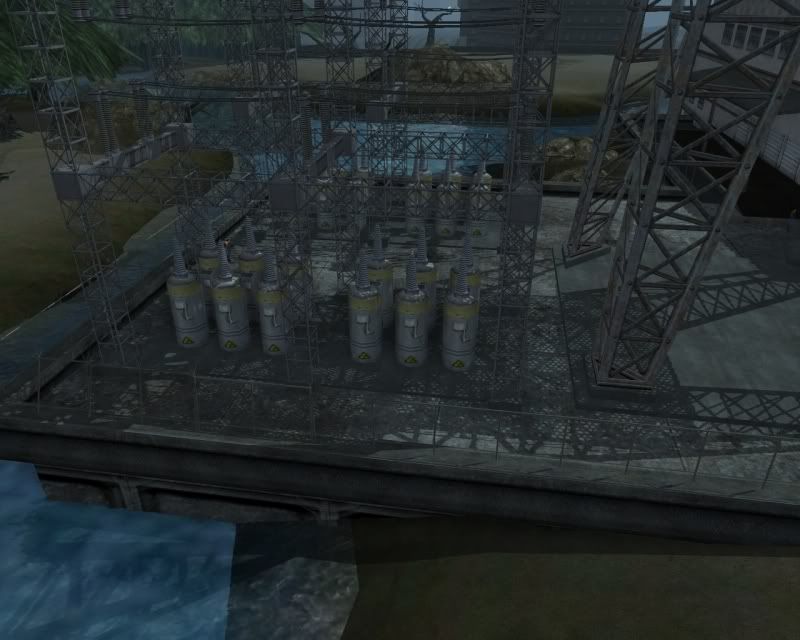
Would you believe me if I told you this lagged?
-
You know, I'm a cynical ******* most of the time. I looked at the thread and my reaction was "Bah humbug!" But even I have to admit I was impressed. VERY good work there, Dark. I am impressed
The one thing that really hit me was Ultra Mode, though. Issue 17: Feel the Lag! If that ends up imprinting even on a movie THIS good-looking, I am concerned, specifically because I'm facing similar problems.
Either way, sooner or later Paragon Studios are going to have to acknowledge your work, because you make their game look GOOD! -
I'd share my pics, but since I can't run shadows without being basically unable to play CoV, I don't have much to share.
-
Quote:The main problem was that the sharks would leave the water and become land sharks, then when they were restricted to water only, they became easy pray as they were unable to respond. Tanks, as you mentioned, are all about ranged damage, and I have no problem allowing a tank's main gun to have more range than any player attack ever could. These things shoot at each other from over 4 km in real life, so it'd only fit. It's the old hover-sniping problem, and the old hoversniping solution - give all enemies an outranging ranged attack, which this would have by definition.Originally Posted by M_I_Abrahms
Actually the only thing that I can thing of, really isn't even close to an explanation. Back when Back Alley was talking about why the shark model never made it in game as an actual enemy, he mentioned turning off their ability to jump. He said this wouldn't work, because then folks would just hover above them and shoot them at range for risk free XP. Of course, this wouldn't work as an explanation for the Tanks, because they're all about ranged attacks.
Something else, as well...
That's kind of something I considered, myself. A regular tank basically has one coaxial machinegun on the side of the main gun, one hull-mounted machinegun for someone on the inside to fire and one free-turning machinegun on the turret. As such, a tank's full firepower greatly depends on where it is facing, which isn't something City of Heroes is good about supporting. Not that that wouldn't be cool, though. Basically, this presents the same problem as those... What kind of tanks were they? In WW2, a particular type of German tank killer was sent into action without any mounted machineguns and just the hull-fixed main gun. As expected, Allied soldiers had a field day climbing all over the things on foot and strapping high explosives to them. A tank's main gun is powerful, but at short range, isn't really mobile enough to do for its sole armament.Quote:Originally Posted by AzureSkyCiel
Also accounting for modern Super Technology, I would estimate a City of-verse tank to have a railgun main cannon, missile batteries, anti-personal gun turrets, and heavy armor all around the whole thing would probably be cognatized like Lusca in some respects.
Now, there are two solutions to this. One is the obvious - go the UT2004/Battlefield 2142 route and slap an articulated auto cannon on top of the turret, similar to how "Turrets" will switch to a flamethrower if a player walks so close he's between the gun barrels. That way, if someone closes in on the tank past the minimum reach of its maingun, it'd switch to that powerful machine gun. Alternately, go the WW1 tank route and stick guns all over the tank, in addition to its main gun, which it would use at closer ranged (closer than its main gun, anyway) or in case an enemy walked too close past the main gun's minimum range. Modern-day tanks notwithstanding, there's nothing saying that a PPD hard suit style tank can't exist that had these kinds of guns all over its hull. It'd look cool, at the very least.
As to why "that" would be cool, here's a problem with modern-day "challenging" fights - invariably they come down to something with huge resistances, lots of hit points and powerful attacks. There's usually some kind of gimmick to avoid some of those problems, but at best they're bugs, and at worst just fiddly mechanics, like having to shoot M. Bison with the dimensional disruptor thing. What about an AI gimmick similar to what Malta soldiers used to do? Before, if you walked into melee with a Gunslinger, he'd stick to his basic attacks and not use his more powerful ones. Even today, walking into point-blank melee with a Titan will force it to use only its punching attack. Why not have a similar kind of gimmick as that for a tank? A few things I can think of:
Have the bulk of the thing's firepower pointing forward, such that it can't attack people to the sides without turning its body or its turret. This allows teams split up and avoid the heaviest of its fire by ensuring squishies stay out of its line of fire. Or, why not let a speedy enough character be able to run around such an enemy fast enough to keep out of its line of fire most of the time? I mean, a main gun would have a SERIOUS punch, but if you can avoid letting it point at you...
Or have the thing switch between several AI modes. At long range, it'll just hang back and shoot just its main gun. At medium range, it would try to back up, keeping within range of its secondary guns, but far enough away to be out of range of YOUR attacks. At close range, it would stop trying to use its main gun (possibly aiming it at someone farther away) and instead switch to secondary guns only, but MORE of them. This would make it a valid tactical choice to decide what distance to fight the thing at.
Or how about giving it limited sight? I'm pretty sure unaggroed NPCs have a higher visual range ahead of them than they do behind them, as it's patently easy to sneak up on one from behind even without stealth powers, yet walking up to the front of one has you instantly spotted. So why not have the thing be able to lose sight of players not within some cone in front of it? Have it lose aggro often and have to reaggro only on what it sees. Vahzilok zombies seem to do that to some extent, and as far as I'm aware, that mechanic is unique to them.
I mean, there's a LOT of ground for cool gimmicks with a tank
